
The most impressive device isn’t always the right one. If you’re asking how to choose the right electronic device, start with what you need it to do every day, not the longest feature list. A sleek design or advanced capability may catch your eye, but the best fit is the one that works with your routines, priorities, and budget.
It’s easy to get caught between specifications that sound essential and extras you may rarely use. Compatibility matters too: a device should work with the services, accessories, and technology already in your routine. Start with those needs, and the decision becomes clearer.
This practical checklist will help you turn daily tasks into a focused shortlist, weigh useful features against attractive add-ons, and set a realistic budget. You’ll also learn what to check about compatibility, performance, and long-term use before ordering online. With a needs-first approach, you can compare options across Voltix’s curated selection of modern electronics and digital devices with greater clarity.
Key Takeaways
- Start with the tasks you need a device to handle, then turn them into clear requirements.
- Consider where and how often you’ll use it, who will share it, and how it fits with your existing technology.
- Rank features as essential, useful, or optional so attractive extras don’t drive the decision.
- Compare product details with your must-haves instead of relying on promotional language alone.
- Use a needs-first process to choose the right electronic device and explore Voltix’s curated selection with greater clarity.
How to Choose the Right Electronic Device by Starting With Your Needs
Start with the task, not the most impressive specification. A device is hardware selected to perform everyday tasks, from communicating and learning to creating, organizing, or enjoying digital content. The broad range of consumer electronics can make comparison feel like a contest of features. A better starting point is the role the device needs to play in your life.
One device can feel effortless for one routine and limiting for another. Someone who checks messages and browses occasionally may be well served by straightforward capabilities. Someone who uses a device daily for demanding creative work may need different performance and controls. Neither person needs the “best” device in the abstract. They need one suited to their tasks.
Device fit depends on the work you ask it to do, not on the specifications that look most impressive. Define that work first. You’ll have a practical basis for comparing options and a clearer way to spot features that matter.
Which tasks should the device handle?
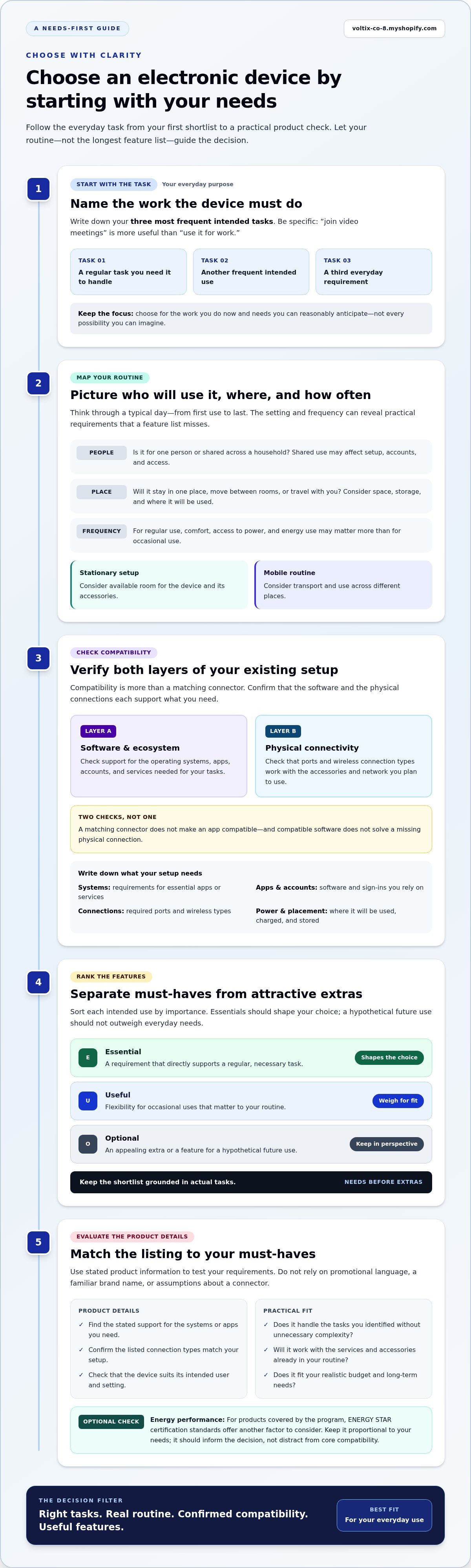
Write down your three most frequent intended tasks. Be specific: “join video meetings” gives you more direction than “use it for work.” Then sort each task as essential, occasional, or aspirational. Essentials should shape your choice. Occasional uses may call for flexibility, while a hypothetical future use shouldn’t outweigh the needs you face every day.
Consider the user and setting, too. Is the device for one person or shared across a household? Will it stay in one place, travel between rooms, or go wherever you do? A shared device may need to suit different users, while a frequently carried one must fit your routine. These details turn general preferences into useful requirements.
What does a good fit look like?
A good fit brings together usability, compatibility, and appropriate capability. The device should feel manageable for its intended user, work with the technology and services already in your routine, and handle the tasks you identified without unnecessary complexity. An advanced feature can still be irrelevant if it doesn’t improve the way you’ll use the device.
Choose for the work you do now and the needs you can reasonably anticipate, not every possibility you can imagine. Buying for an unlikely future scenario can distract from everyday comfort and useful functionality. Use a short checklist to keep the decision grounded:
- Purpose: Which regular tasks must it support?
- People and place: Who will use it, and where?
- Fit: What would make it comfortable and practical in that setting?
This needs-first foundation makes it easier to choose the right electronic device with intent. Next, test those requirements against your routine, environment, and existing technology.
Match an Electronic Device to Your Routine, Environment, and Existing Tech
A device has to work where your day happens. A model that stays on a desk has different demands from one you carry between home, work, and travel. Frequency matters too: when you use a device for hours each day, comfort, access to power, and energy use may matter more than they would for occasional use.
Map the device to a typical day. Note where you’ll use it, how often you’ll reach for it, whether you need to carry or share it, and what space and charging access are available. A stationary setup may have room for a larger device and its accessories. A mobile routine may favor something easier to transport and use in different places. Shared use can also affect setup, accounts, and how easily different people access what they need.
How will you use the device day to day?
Picture the moments when you’ll use it, not just the tasks themselves. Will you need a clear view from across a workspace, room to connect other equipment, or a place to store the device between sessions? Think through a normal day from first use to last. This can reveal practical needs that a feature list alone misses.
Will it work with your existing technology?
Compatibility has two distinct layers. Software and ecosystem compatibility means the device supports the operating system, apps, accounts, and services needed for your tasks. Physical connectivity means its ports and wireless connection types work with the accessories or network you plan to use. A matching connector won’t make an app compatible, and compatible software won’t solve a missing physical connection.
Before comparing options, note the requirements tied to your setup:
- Operating systems: Check which systems your essential apps or services support.
- Apps and accounts: Identify the software and sign-ins you rely on, including any shared access needs.
- Connections: List the physical ports and wireless connection types required by your accessories and network.
- Power and placement: Consider where the device will be used, charged, and stored during a typical day.
Compare those needs with the product description’s stated compatibility information. Look for the relevant system or app support and the connection types you need. Don’t infer compatibility from a familiar brand name or a port that looks similar. The listed details should match your setup.
If the device will be in regular use, energy efficiency may also be worth weighing alongside practical fit. For products covered by the program, ENERGY STAR certification standards offer another way to consider energy performance. Keep that check proportional to your needs; it should inform the decision, not distract from core compatibility.
Compatibility is the relationship between a device and the setup it needs to join. Once you’ve mapped that relationship, you can browse modern electronics and digital devices with a clearer sense of what will fit your routine.
Separate Essential Device Features From Extras That Add Little Value
A long feature list can make every capability seem decisive. It isn’t. Specifications matter when they change how well a device handles your intended task. Start with the requirements you identified, then judge each feature by its practical effect. This keeps the comparison focused on performance you’ll use rather than capability that only sounds impressive.
A must-have feature supports a task you perform frequently or need the device to handle reliably. Use that definition to sort features into three levels:
- Essential: Required for a frequent task, core compatibility, or a basic need.
- Useful convenience: Improves comfort or efficiency, but isn’t necessary to complete the task.
- Optional extra: Adds appeal, yet has little effect on your regular use.
Which specifications deserve attention?
Connect each specification to a task before comparing it. Ask what the detail changes: does it affect the work you need to do, how comfortably you can do it, or whether the device works with your setup? If not, it may not deserve much weight. Technical terms matter when they clarify a real difference in capability, not simply because they appear in a product description.
Use this comparison table to translate needs into details worth checking. Adapt the examples to your intended device and routine.
| Requirement | Why it matters | Product detail to check |
|---|---|---|
| Handle a frequent task | Core tasks should feel practical in regular use. | Stated capabilities directly related to that task |
| Work with existing technology | A feature has less value if it doesn’t fit your setup. | Listed software, service, and connection compatibility |
| Suit the way you use it | Comfort and access can shape everyday usefulness. | Relevant design, portability, or control details |
| Stay within your budget | Prioritizing needs helps focus spending on meaningful value. | Which included capabilities support your must-haves |
How do you judge value beyond the feature list?
Rate each feature for usefulness and frequency of use, such as high, medium, or low. Then compare its importance with your overall purchase budget. Design, portability, and convenience can be essential for one person and optional for another. This isn’t a technical benchmark. It’s a way to make your priorities visible.
For example, imagine a device includes an impressive customization feature you expect to use only once. If your regular work depends on a different capability, that extra shouldn’t outweigh the feature that supports your routine. Keep it on the optional list unless it solves a concrete problem or meaningfully improves frequent use.
Compare product details against your ranked requirements. A clear hierarchy makes it easier to choose the right electronic device without treating every advertised capability as equally valuable.
Pre-Purchase Checklist to Evaluate Electronics Online
An online listing is most useful when you read it against your own requirements. Product images and promotional copy can draw attention, but they don’t replace clear details. Before ordering, use this checklist to review intended use, compatibility, stated product information, and store policies. Keep your must-have list open as you assess each option.
- Restate the intended use. Note the main tasks the device needs to support and the context in which you’ll use it. This keeps your evaluation focused on practical fit.
- Check compatibility. Compare the listing’s stated operating system, app, service, and connection information with the setup you already use. Treat software support and physical connectors as separate checks.
- Review the specifications. Find the product details that relate directly to your tasks. Compare those stated features with your must-have list rather than relying on broad claims such as “powerful” or “versatile.”
- Confirm included items. Look for an explicit description of what comes with the device. Don’t assume an accessory or other item is included unless the product page says so.
- Read delivery and return terms. Locate the store’s published policies and review the details that apply to your order before proceeding. Don’t infer delivery timing or return conditions from promotional language.
- Compare the remaining options. Remove any device that misses a non-negotiable requirement. Evaluate the options that remain against the same priorities, then choose the one that best fits your routine.
What should you verify on the product page?
Use the product description and specifications as your evidence. Check each listed feature against a specific task, then review the stated connectivity details and included items. If a detail affects a must-have, make sure the listing addresses it clearly rather than filling gaps with assumptions. Review the published delivery and return information separately. These terms are part of making an informed online purchase.
How can you make the final decision?
Apply the same criteria to every remaining option. A simple comparison can show which device meets your core requirements, which adds useful convenience, and which mainly offers extras. If two options both fit, give more weight to the details that support frequent tasks. The longer feature list isn’t automatically the stronger choice.
This process turns product-page browsing into a clear decision rather than a reaction to marketing language. Use it as you browse modern electronics and devices, checking each listing against your priorities before ordering. A focused review helps you choose the right electronic device with confidence in the fit, the stated details, and the policies you’ve read.
Choose With Confidence, Then Explore Voltix's Curated Electronics
A confident choice comes from a clear process, not a perfect-looking spec sheet. Define the tasks the device needs to handle. Match it to your routine, environment, and existing technology. Rank features by practical value, then review the product listing and its published terms. Each step narrows the field and gives you a consistent basis for comparing options.
Turn your checklist into a focused shortlist
Keep only the options that meet your essential use and compatibility requirements. A device that misses a non-negotiable should not stay in contention simply because it has an appealing design or a longer feature list. For the remaining options, compare the same details side by side: stated capabilities, connections, included items, and relevant store policies.
Then ask one final question: which option best supports your actual routine? A feature that matters daily deserves more weight than one that may never leave the product page. A particular design or convenience may also be a genuine priority if it makes the device more practical for the way you’ll use it. The right choice is personal, but the decision can still be deliberate.
Explore modern electronics with a clear purpose
With your requirements defined, browsing becomes more focused. Voltix offers a curated selection of modern consumer electronics and digital devices through its online shop. Use your shortlist to guide what you explore, and assess each relevant listing against the needs you’ve already identified. That keeps the decision grounded in fit instead of turning the search into an open-ended hunt for features.
Before placing an order, return to your essential requirements and confirm that the option still meets them. Review the product information and published terms, and make sure no assumption has replaced a stated detail. A short final review can reinforce why an option made your shortlist and help you proceed with clarity.
When you choose the right electronic device for your own needs, the result is a more considered addition to your everyday setup. Define the purpose, evaluate the fit, and let your priorities lead. Explore electronics and digital devices through Voltix's curated online selection.
Make Your Next Device Choice With Purpose
A well-chosen device can do more than add new capability. It can make a familiar part of your day feel simpler, more focused, or easier to manage. That value starts with a decision grounded in how you actually live, not pressure to keep up with every new feature. When you choose the right electronic device for your priorities, you’re choosing a tool with a clear place in your routine.
Let that clarity guide your next step. Browse with your requirements in mind, compare options at your own pace, and focus on the device that fits your needs without unnecessary compromise. Voltix offers a curated selection of modern electronics and digital devices for online browsing.
Explore Voltix's curated electronics and digital devices and move forward with a choice that feels considered, capable, and distinctly yours.
Frequently Asked Questions
Can I keep using an older electronic device if it still works?
Yes, if it still meets your needs and receives security updates. A device may function while becoming less suitable for sensitive tasks if its software support has ended. Check whether your essential apps still run, whether the battery lasts long enough for your routine, and whether the device can connect reliably. If it handles your everyday tasks securely, replacing it may not be necessary yet.
Is a refurbished electronic device a good choice?
A refurbished device can be a suitable option if its condition, included items, software support, and return terms fit your expectations. Read the listing closely for the device’s condition and any stated testing or refurbishment details. Compare its remaining useful life and compatibility with those of other options. Refurbished doesn’t automatically mean poor quality, but the specific listing should give you enough information to make an informed decision.
How can I protect my personal information when setting up a new device?
Use a strong screen lock and a unique password for the account linked to the device. Turn on multi-factor authentication when available, install software updates, and review app permissions before granting access to contacts, location, camera, or microphone. Avoid restoring data you no longer need. If you’re transferring information from an older device, use the account or transfer tools provided by the relevant software platform.
Do all electronic devices need an internet connection?
No. Some devices can perform core functions offline, while others depend on internet access for setup, cloud services, streaming, syncing, or updates. Check what you need the device to do without a connection. For example, downloaded documents may remain available offline, while a cloud-based service may not. If reliable access is essential, consider where you’ll connect and what happens when that connection is unavailable.
Can I use one charger for multiple electronic devices?
Sometimes, but only when the charger and each device are compatible. Compare the connector, supported charging standard, and power requirements stated for both. A connector that fits does not by itself confirm that charging will work as intended. Use the device maker’s guidance when available, especially for unfamiliar chargers or cables. If a device charges slowly or reports a compatibility issue, use an appropriate charger instead.
How often should I update an electronic device's software?
Install security and system updates when they’re offered, following the device’s update instructions. Updates can address security issues, improve stability, or maintain compatibility with apps and services. If you prefer to review changes before installing, check the update notes and make sure important files are backed up first. For a device that no longer receives updates, consider whether it remains suitable for tasks involving sensitive information.
What should I do with an electronic device I no longer use?
First, back up anything you want to keep, then sign out of accounts and erase personal data using the device’s reset or secure-wipe option. Remove any memory cards or accessories you plan to reuse. If the device still works, consider whether someone else can use it through a suitable reuse or donation option. Otherwise, look for an electronics recycling program in your area, rather than putting it in household waste.