
Your phone, television, and smart home controls may seem like separate products, but they share a common foundation: electronics use circuits to process signals and perform tasks. Understanding that foundation makes it easier to compare devices, spot which features matter, and choose technology that fits your routine.
You don’t need an engineering background to make sense of electronics. Start with what a device takes in, how it processes information, and what it does in response. That simple framework can help you look past technical terminology and focus on practical use.
This guide explains how electronics differs from basic electrical equipment and how sensors, processors, and outputs work together. You’ll also learn how to assess a device’s purpose, compare specifications, and check compatibility before ordering. With those basics in mind, you can explore consumer technology more purposefully and choose devices for what they help you do, not just for the features they advertise.
Key Takeaways
- Understand what electronics covers and how it differs from devices that simply use electricity.
- Follow how inputs become processed signals and useful outputs in everyday devices.
- Match a device’s essential functions and compatibility to the tasks you need it to perform.
- Compare equivalent specifications and narrow your options by setting clear priorities first.
- Explore Voltix’s curated selection of modern electronics and digital devices for purposeful tech choices.
What Does Electronics Include in Everyday Life?
Electronics is technology that uses circuits to control or process electrical signals, allowing devices to sense, calculate, communicate, or respond. The same idea connects the screen displaying a message, the controls adjusting a room’s lighting, and the components that turn a button press into an action.
The term can refer to three related things. An electronic component is an individual part, such as a transistor or sensor. An electronic device combines components to perform a task. The broader field covers how those parts and devices are designed and used. This distinction helps make sense of a crowded category: electronics describes how technology works, not one specific kind of product.
For everyday decisions, a device’s purpose is often more useful than its technical label. It might help you:
- Capture or display information, such as a photo or a video call.
- Send and receive signals to communicate with another device.
- Sense a change, such as movement or temperature, and respond to it.
These examples show why electronics spans simple controls and complex digital systems. The fundamentals of electronics reach from circuits and semiconductors to the functions people rely on every day.
How Are Electronics Different from Electrical Devices?
Electrical equipment primarily uses electrical power to create heat, light, or motion. Electronics uses circuits to manage signals, information, or device behavior. A basic toaster sends power to heating elements to brown bread. Electronic controls can add settings that sense or regulate how an appliance operates. The difference is about function, not whether a device plugs into a wall.
What Counts as Consumer Electronics?
Consumer electronics are electronic devices designed for personal or household use. They support a range of activities, from communication and entertainment to computing and home control. Some perform a straightforward task; others combine sensors, software, displays, and wireless connections. Focus on the job a device does rather than assuming every product in this broad category has the same features or complexity.
That perspective makes comparisons more practical. If you want to capture memories, consider the device’s image and storage functions. If you want to manage information, look at how it supports the apps and accessories you already use. A product category is only a starting point. Its role in your routine helps you decide whether its capabilities are relevant.
Voltix is an online retailer with a curated selection of modern consumer electronics and digital devices. To browse with purpose, first identify what a device does and then consider whether that function fits your needs.
How Modern Electronics Turn Signals into Useful Functions
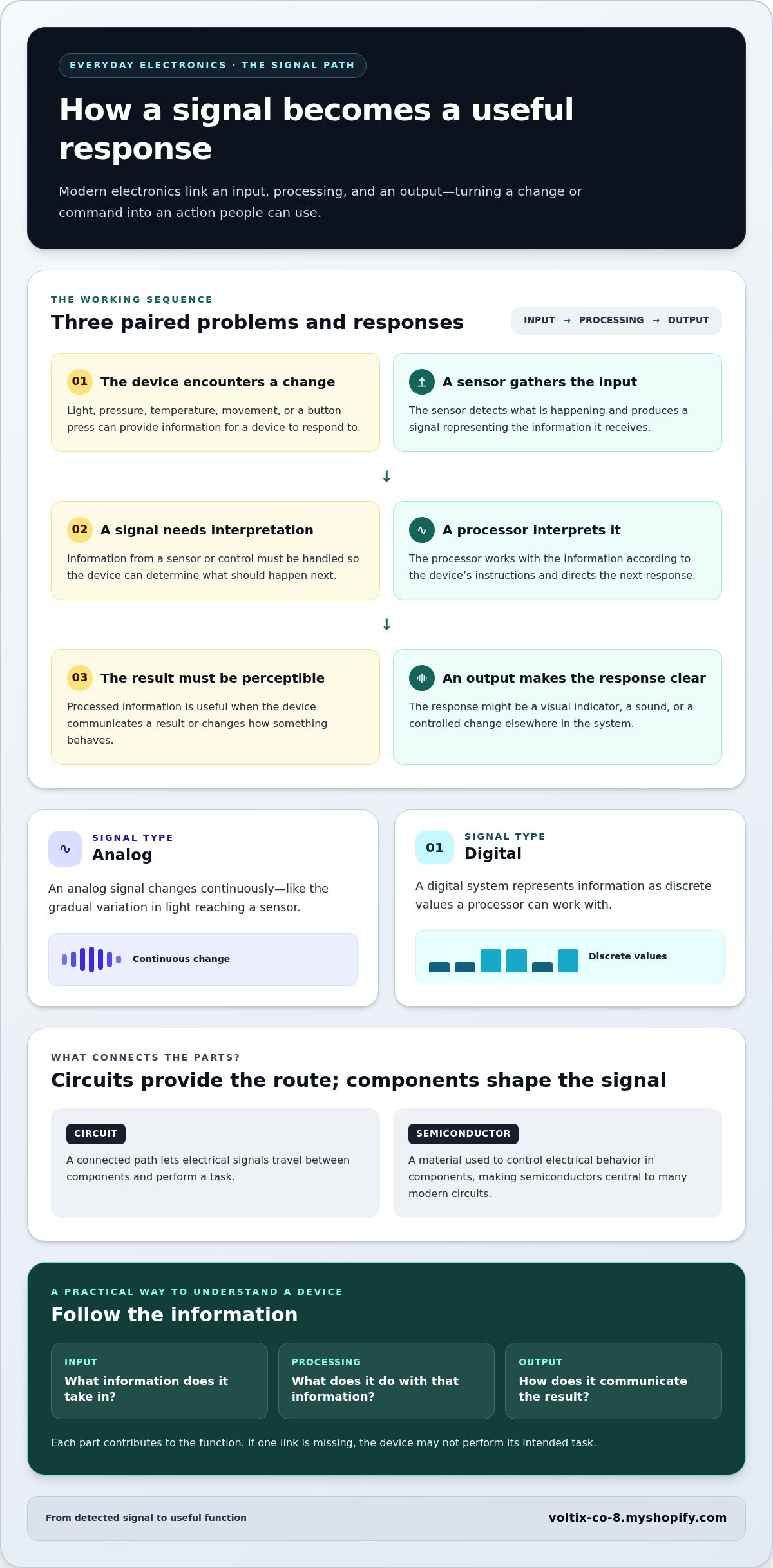
A device becomes useful when it takes in information, interprets it, and produces a response. In electronics, that process links physical components into a coordinated system. A change in light, pressure, or temperature, or a button press, can become a signal that guides what the device does next.
A circuit turns electrical signals into useful functions by guiding them through components that detect, interpret, and respond to information. The sequence is input, processing, and output. The engineering may be sophisticated, but the purpose is practical: turn a signal into an action a person can use.
What Roles Do Circuits and Semiconductors Play?
A circuit is a connected path that lets electrical signals travel between components and perform a task. Some components guide or change the signal along the way. Semiconductors are materials used to control electrical behavior in components, making them central to many modern circuits. Together, these elements create a route from an incoming signal to a response.
That route is what makes the components work as a device. The principles of electronic signal processing explain how circuits and semiconductor components control signals for practical uses. You don’t need to study circuit design to understand the result: each part contributes to a function, such as sensing a change or presenting information.
How Do Sensors, Processors, and Outputs Work Together?
Imagine a device that responds to a change in room brightness. A sensor receives light as input and produces a signal representing what it detects. A processor interprets that information according to the device’s instructions, then directs an output. That output might be a visual indicator, a sound, or a change elsewhere in the system.
Each component has a distinct role, but its value comes from working with the others. The sensor gathers information, the processor interprets it, and the output makes the response perceptible. If one link is missing, the device may not perform its intended function.
Signals can be analog or digital. An analog signal changes continuously, like the gradual variation in light reaching a sensor. A digital system represents information as discrete values a processor can work with. Many devices convert a sensor’s changing input into digital information, then process it to determine what action follows. This distinction is useful without needing to understand binary code.
For consumers, the signal path offers a simple way to assess a device’s purpose. Ask what information it takes in, what it does with that information, and how it communicates the result. A screen, sound, or controlled action is the outcome of components performing a coordinated task.
With that process in mind, explore modern electronics and digital devices at Voltix by focusing on the functions you need.
How to Judge Whether an Electronic Device Fits Its Purpose
Start with the task, not the feature list. A device should make a specific part of your day easier, more effective, or possible. Once you’ve identified that task, separate essential functions from optional extras. A feature adds value when it supports how you’ll actually use the device.
Use this comparison to focus on fit. The questions can help you assess options against your needs.
| Comparison point | What to consider | Practical question |
|---|---|---|
| Purpose | The main task the device should support | What do I need it to help me do? |
| Essential functions | Capabilities directly tied to that task | Which functions will I use regularly? |
| Compatibility | How it connects or works with technology you already use | Will it fit into my existing setup? |
| Expected use | Where, how often, and for how long you expect to use it | Does its design suit my routine? |
Which Functions Matter for Your Intended Use?
Translate a broad want into a clear job. If you need a device for reading, consider display comfort and the kind of content you plan to access. If your priority is staying in touch, focus on the communication functions you’ll rely on. Needs differ, so there’s no universal feature checklist. More functions can add complexity without improving the task that matters to you.
Sort features into two groups: must-have capabilities that enable your intended use, and nice-to-have additions that could be useful but aren’t essential. This keeps your attention on practical value rather than headline appeal.
Why Compatibility and Usability Belong in the Comparison
A device’s usefulness depends partly on how it fits with your existing technology. Check the connection types, supported standards, or software requirements that matter for your setup. For example, a device may be less convenient alongside another if they use different connections or don’t support the same functions. Compatibility depends on the particular combination, so compare the details for the devices you plan to use together.
Usability matters just as much. Consider whether the controls are understandable, setup suits your comfort level, and routine tasks seem straightforward. A capability you rarely use may matter less than a clear interface you interact with every day. Picture a typical session, from setup to the task you want to complete.
A device’s usefulness depends on how well its essential functions fit your needs, not on how many features it lists. Compare options against the same purpose and expected routine. This gives you a practical basis for choosing among electronics without treating any one specification as a universal winner.
How to Explore Electronics Without Getting Lost in the Options
A broad search can quickly become a stream of specifications, feature names, and competing claims. Set a direction before you browse. Define the job you need a device to do, then use the same priorities to compare options. This keeps your attention on practical fit rather than the most prominent number or feature.
Use this four-step process to build a focused shortlist:
- Define the need. Name the task or routine you want to support. “Keep track of appointments” is more useful than “find a new device.”
- Set priorities. Note the essential functions, compatibility needs, and expected pattern of use. Separate must-haves from features you’d simply enjoy.
- Review the fit. Compare how each option supports your task, works with your existing technology, and suits your routine.
- Narrow the options. Remove choices that miss a core requirement. Compare the remaining options using equivalent specifications and product information.
How Can You Narrow a Broad Electronics Search?
Start with a category that reflects your task, then make your search more specific. For example, if you want to follow instructions while cooking, decide whether you need a device for viewing recipes, playing audio, or both. Set a short list of essential functions before browsing. Category labels can help organize options, but the device’s role in your routine should guide your shortlist.
Keep the list manageable. A few priorities are easier to compare than a long set of preferences. If a new feature catches your eye, ask whether it supports the task you defined. If it doesn’t, treat it as optional rather than letting it redirect your search.
What Should You Review Before Placing an Online Order?
Read the product description and specifications for the exact item you’re considering. Check the details tied to your priorities, including its functions, connection requirements, and compatibility information. Compare like with like: two figures are useful side by side only if they describe the same measurement under comparable conditions. An impressive number alone doesn’t show whether an item suits your intended use.
Before ordering, review the purchase information and terms that apply to the transaction. This helps you make a decision based on the details provided rather than assumptions. Keep your choice anchored to the original need; a longer specification list isn’t automatically a better fit.
With your priorities set, explore Voltix’s curated selection of modern consumer electronics and digital devices. Browse modern devices and compare each option against the task you want it to support.
Explore Voltix Electronics for a More Purposeful Tech Upgrade
Understanding how devices work makes browsing more deliberate. Rather than choosing from a crowded feature list, start with the task you want to support, the functions you’ll use, and the technology the device needs to work with. Those priorities give each option a clear standard to meet.
Voltix is an online retailer with a curated selection of modern consumer electronics and digital devices. You can browse and order hardware through the online store for home delivery. Use what you’ve learned to explore options with a clear purpose and choose devices that serve a genuine need.
What Does a Curated Electronics Selection Offer the Reader?
A curated selection gives you a focused place to explore consumer technology. Keep your everyday need at the centre: a device is relevant when its functions support something you want to do, fit your existing setup, and suit how you expect to use it.
As you browse, keep your priorities visible:
- The task the device should help you complete.
- The functions that directly support that task.
- The compatibility details that matter for your current setup.
This short filter helps prevent an appealing extra from taking the place of a genuine requirement. It also gives you a consistent way to assess each item, even when you encounter unfamiliar terms or features.
What Is the Next Step After Defining Your Tech Needs?
Turn your notes into a practical comparison. Review each item’s product information for the functions and specifications that match your intended use. Compare compatibility details with your existing technology, and read the purchase information before placing an order. This helps you make a considered choice based on the details available.
Keep the process measured. You don’t need to evaluate every possible device or feature. Focus on options that answer your original need, then compare equivalent details so each choice is judged on the same basis. If an option misses an essential requirement, remove it from your shortlist.
With your purpose, useful functions, and compatibility needs in view, explore Voltix’s online selection of modern electronics and digital devices. Browse with your priorities in mind, review the information for the item you’re considering, and choose with clarity.
Make Your Next Tech Choice Count
A useful technology choice earns its place in your routine by supporting a task you care about. As you consider what to buy, use a clear purpose as your standard. It turns a crowded electronics search into a comparison of options against needs you can describe.
Take time to compare the details that matter: essential functions, compatibility, and how a device will fit into everyday use. The right choice is personal, and it should support your routine rather than draw your attention to features you won’t use.
Ready to explore? Explore Voltix electronics and browse modern devices with your priorities in mind.
Frequently Asked Questions
What is the difference between electronics and electrical devices?
Electrical devices mainly use power to produce heat, light, or movement, while electronics use electrical signals to control or process information. Some products combine both roles. A washing machine, for example, uses electricity to turn a motor and may also use electronic controls to select cycles. The distinction is useful when comparing products because one household device can include both electrical and electronic functions.
What are examples of consumer electronics?
Consumer electronics include personal and household devices used for communication, information, entertainment, or convenience. Examples include phones, computers, televisions, headphones, digital cameras, and connected home controls. These products can differ greatly in design and capabilities, but they share an intended personal or household use.
How do electronic circuits make devices work?
Electronic circuits connect components so a device can respond to an input and carry out a task. Pressing a control, for example, can create a signal that a circuit interprets, prompting a display or sound. In another device, a sensor may register a change and the circuit may trigger an alert. The components vary, but their coordinated roles turn an input into an observable response.
Can different electronic devices work together?
Yes, devices can work together when their connections, communication standards, and required software are compatible. A shared connection type may allow one device to transfer data or receive power, while a shared wireless standard may enable communication. Compatibility can still depend on the exact models and supported functions. Before combining devices, check whether they support the same connection or standard and any required app or system.
How can I tell which features I actually need?
Picture a specific moment when you expect to use the device, then identify what would make that task easier. If you need it for video meetings, for instance, consider the functions that help you see and hear participants clearly. Separate those requirements from extras you might use occasionally. This grounds the decision in your routine and makes it easier to set aside features that don’t solve a real need.
What should I check before ordering electronics online?
Check the listing for the exact model, its stated specifications, and what the product description says is included. Confirm that its connections and supported functions suit your intended setup. Then review the purchase information and terms before placing an order. If you’re comparing alternatives, keep each listing handy so details from different models don’t get mixed up.
How do I choose electronics for everyday use?
Choose electronics by considering how they’ll fit into your actual day, not only how they look on a specification sheet. Think about where you’ll use the device, who will use it, and whether its controls and form suit that setting. A shared household device may need to be simple for several people, while a personal one can be tailored to one person’s routine. Prioritize consistent usefulness over novelty.